Feedbacks
Overview
With GamePush, you can set up a feedback system from players. Players can send feedbacks (bugs, complaints, suggestions, reviews) with attached files (screenshots, videos), and you can view them in the admin panel and respond to them via chat.
Feedbacks are automatically sent to both the game developer and the platform (if it's a partner), allowing you to respond quickly to player issues.
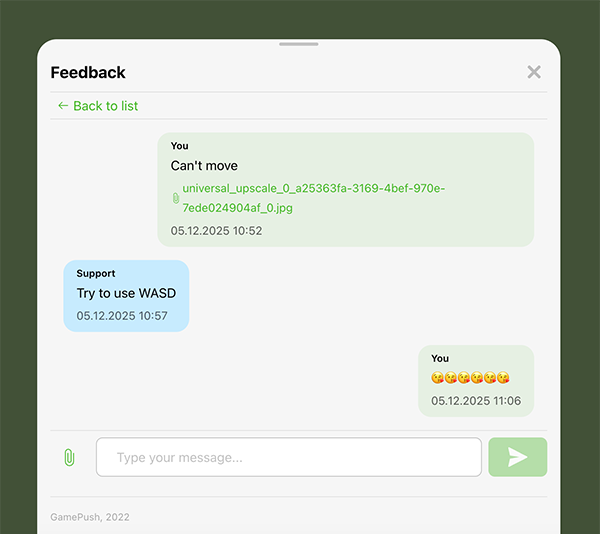
Example
Working in the Admin Panel
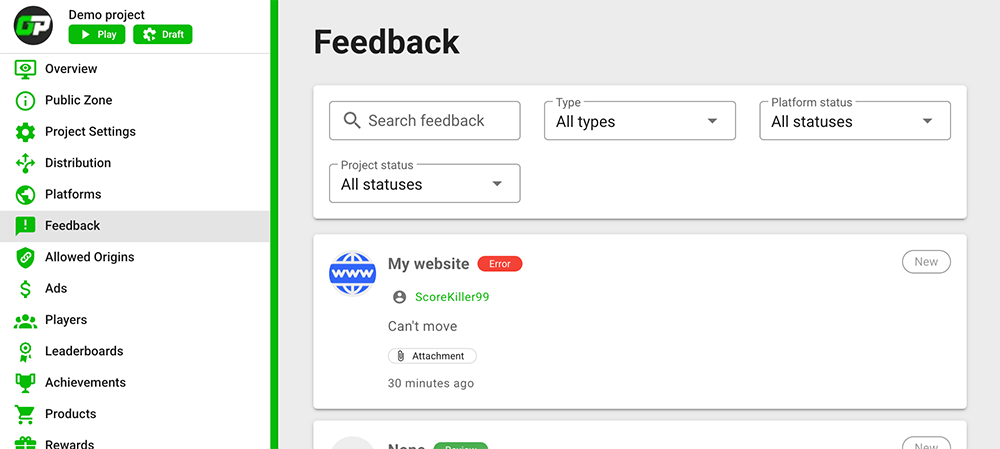
In the "Feedback" section of your project, you can:
- View the list of feedbacks from players
- See from which platform the feedback was created
- See the linked player for quick review
- Communicate with the platform and player in the feedback chat
- Manage feedback status: set resolved / unresolved status or in progress
When chatting, you can hide your message from the player. Only you and the platform will see it.
Send Feedback
+1 RequestSend feedback with text and attached files (screenshots, videos). The feedback will automatically be sent to the game developer and the platform (if it's a partner).
- JavaScript
- Unity
const feedback = await gp.feedbacks.send({
    // Feedback type: "ERROR" | "COMPLAINT" | "SUGGESTION" | "REVIEW"
    type: 'ERROR',
    // Feedback text
    text: 'These noobs are not like all other noobs',
    // Attached files, upload as shown in the "Files" section
    files: ['https://example.com/image.png', 'https://example.com/video.mp4'],
    // User-Agent (optional, determined automatically)
    userAgent: 'Custom User Agent',
});
FeedbackData data = new FeedbackData
{
    // Feedback type: "ERROR" | "COMPLAINT" | "SUGGESTION" | "REVIEW"
    type = "ERROR",
    // Feedback text
    text = "These noobs are not like all other noobs",
    // Attached files (URLs)
    files = new string[] { "https://example.com/image.png", "https://example.com/video.mp4" }
};

GP_Feedbacks.Send(data, OnSendFeedback, OnSendFeedbackError);
To upload files, use the "Files" module. Upload the file and get a link, specify the link in the feedback.
The method returns feedback data:
- JavaScript
- Unity
const feedback = await gp.feedbacks.send({
    type: 'ERROR',
    text: 'These noobs are not like all other noobs',
    files: ['https://example.com/image.png'],
});

/**
 * Feedback ID
 * @type {number}
 */
feedback.id;

/**
 * Feedback type
 * @type {"ERROR" | "COMPLAINT" | "SUGGESTION" | "REVIEW"}
 */
feedback.type;

/**
 * Feedback text
 * @type {string}
 */
feedback.text;

/**
 * Feedback status
 * @type {"NEW" | "IN_PROGRESS" | "RESOLVED" | "UNRESOLVED" | "REQUIRES_ACTION"}
 */
feedback.status;

/**
 * Messages in feedback
 * @type {Array<Message>}
 */
feedback.messages;
private void OnSendFeedback(FeedbackData feedback)
{
    Debug.Log("ID: " + feedback.id);
    Debug.Log("Type: " + feedback.type);
    Debug.Log("Text: " + feedback.text);
    Debug.Log("Status: " + feedback.status);
}
Send feedback events:
- JavaScript
- Unity
// Feedback successfully sent
gp.feedbacks.on('createFeedback', (feedback) => {});

/**
 * Error sending feedback
 * @type {
 *     'player_not_found' - player account has not been created yet
 *     'project_not_found' - game ID does not match or game does not exist
 *     'empty_text' - feedback text not specified
 *     'empty_type' - feedback type not specified
 *     'invalid_type' - invalid feedback type
 *     'origin_not_allowed' - forbidden origin
 *     'internal_error' - something went wrong
 *     other - any error not related to the service
 * }
 */
gp.feedbacks.on('error:createFeedback', (error) => {});
private void OnSendFeedbackError(string error)
{
    Debug.Log("ERROR: " + error);
}
Open Feedbacks List
+1 RequestOpen a ready-made window with a list of feedbacks with a "Write to us" button. Can be filtered by type and status.
- JavaScript
- Unity
// Open all feedbacks
await gp.feedbacks.open();

// Open feedbacks with filtering
await gp.feedbacks.open({
    // Feedback type (optional)
    type: 'ERROR',
    // Feedback status (optional)
    status: 'IN_PROGRESS',
});
// Open all feedbacks
GP_Feedbacks.Open();

// Open feedbacks with filtering
GP_Feedbacks.Open(
    type: "ERROR",
    status: "IN_PROGRESS"
);
Window open events:
- JavaScript
- Unity
// Window opened
gp.feedbacks.on('openFeedbacksList', () => {});

// Error opening window
gp.feedbacks.on('error:openFeedbacksList', (error) => {});
GP_Feedbacks.Open(OnOpenFeedbacksList, OnOpenFeedbacksListError);

private void OnOpenFeedbacksList() => Debug.Log("ON OPEN FEEDBACKS LIST");
private void OnOpenFeedbacksListError(string error) => Debug.Log("ON OPEN FEEDBACKS LIST: ERROR: " + error);
Open Specific Feedback
+1 RequestOpen a ready-made window with a specific feedback and its messages.
- JavaScript
- Unity
await gp.feedbacks.openFeedback({
    // Feedback ID (string)
    feedbackId: 'xyzv-14444-hexa-151p',
});
GP_Feedbacks.OpenFeedback("14444", OnOpenFeedback, OnOpenFeedbackError);

private void OnOpenFeedback() => Debug.Log("ON OPEN FEEDBACK");
private void OnOpenFeedbackError(string error) => Debug.Log("ON OPEN FEEDBACK: ERROR: " + error);
Fetch Feedbacks List
+1 RequestGet a list of feedbacks to display in your own interface. Can be filtered by type and status.
- JavaScript
- Unity
// Get all feedbacks
const result = await gp.feedbacks.fetch();

// Get feedbacks with filtering
const result = await gp.feedbacks.fetch({
    // Limit number of feedbacks (default 20)
    limit: 20,
    // Feedback type (optional)
    type: 'ERROR',
    // Feedback status (optional)
    status: 'IN_PROGRESS',
});

/**
 * List of feedbacks
 * @type {Array<Feedback>}
 */
const myFeedbacks = result.items;

/**
 * Can load more feedbacks
 * @type {boolean}
 */
const canLoadMore = result.canLoadMore;

myFeedbacks.forEach((feedback) => {
    // Feedback ID
    feedback.id;

    // Feedback type
    feedback.type;

    // Feedback text
    feedback.text;

    // Feedback status
    feedback.status;

    // Messages in feedback
    feedback.messages.forEach((message) => {
        // Message ID
        message.id;

        // Message text
        message.text;

        // Attached files
        message.attachments;

        // Message author: "system" | "player"
        message.author;

        // Feedback ID
        message.feedbackId;

        // Created date
        message.createdAt;
    });
});
// Get all feedbacks
GP_Feedbacks.Fetch(OnFetchFeedbacks, OnFetchFeedbacksError);

// Get feedbacks with filtering
GP_Feedbacks.Fetch(
    type: "ERROR",
    status: "IN_PROGRESS",
    OnFetchFeedbacks,
    OnFetchFeedbacksError
);

private void OnFetchFeedbacks(FeedbackData[] feedbacks)
{
    foreach (FeedbackData feedback in feedbacks)
    {
        Debug.Log("ID: " + feedback.id);
        Debug.Log("Type: " + feedback.type);
        Debug.Log("Text: " + feedback.text);
        Debug.Log("Status: " + feedback.status);

        foreach (MessageData message in feedback.messages)
        {
            Debug.Log("Message ID: " + message.id);
            Debug.Log("Message Text: " + message.text);
            Debug.Log("Message Author: " + message.author);
        }
    }
}
Fetch feedbacks list events:
- JavaScript
- Unity
// Feedbacks list successfully fetched
gp.feedbacks.on('fetchFeedbacks', (result) => {
    // result.items - array of feedbacks
    // result.canLoadMore - can load more
});

/**
 * Error fetching feedbacks list
 * @type {
 *     'player_not_found' - player account has not been created yet
 *     'project_not_found' - game ID does not match or game does not exist
 *     'origin_not_allowed' - forbidden origin
 *     'internal_error' - something went wrong
 *     other - any error not related to the service
 * }
 */
gp.feedbacks.on('error:fetchFeedbacks', (error) => {});
private void OnFetchFeedbacksError(string error)
{
    Debug.Log("ERROR: " + error);
}
Fetch More
+1 RequestLoad the next batch of feedbacks for pagination. Used after the fetch method.
- JavaScript
- Unity
// Load more feedbacks with the same filters
const result = await gp.feedbacks.fetchMore({
    // Limit number of feedbacks (default 20)
    limit: 20,
    // Feedback type (optional)
    type: 'ERROR',
    // Feedback status (optional)
    status: 'IN_PROGRESS',
});

/**
 * List of feedbacks
 * @type {Array<Feedback>}
 */
const moreFeedbacks = result.items;

/**
 * Can load more feedbacks
 * @type {boolean}
 */
const canLoadMore = result.canLoadMore;
GP_Feedbacks.FetchMore(
    limit: 20,
    type: "ERROR",
    status: "IN_PROGRESS",
    OnFetchMoreFeedbacks,
    OnFetchMoreFeedbacksError
);

private void OnFetchMoreFeedbacks(FeedbackData[] feedbacks)
{
    foreach (FeedbackData feedback in feedbacks)
    {
        Debug.Log("ID: " + feedback.id);
    }
}
Fetch more feedbacks events:
- JavaScript
- Unity
// Additional feedbacks successfully fetched
gp.feedbacks.on('fetchMoreFeedbacks', (result) => {
    // result.items - array of feedbacks
    // result.canLoadMore - can load more
});

/**
 * Error fetching additional feedbacks
 * @type {
 *     'player_not_found' - player account has not been created yet
 *     'project_not_found' - game ID does not match or game does not exist
 *     'origin_not_allowed' - forbidden origin
 *     'internal_error' - something went wrong
 *     other - any error not related to the service
 * }
 */
gp.feedbacks.on('error:fetchMoreFeedbacks', (error) => {});
private void OnFetchMoreFeedbacksError(string error)
{
    Debug.Log("ERROR: " + error);
}
Send Message to Chat
+1 RequestSend a message to the feedback chat. The message will be visible to the developer and the platform (if it's a partner).
- JavaScript
- Unity
const message = await gp.feedbacks.sendMessage({
    // Feedback ID
    feedbackId: '352352',
    // Message text
    text: 'Unfortunately, the problem remains :(',
    // Attached files (optional, File objects)
    files: [],
});
MessageData data = new MessageData
{
    // Feedback ID
    feedbackId = "352352",
    // Message text
    text = "Unfortunately, the problem remains :(",
    // Attached files (optional)
    files = new string[] { }
};

GP_Feedbacks.SendMessage(data, OnSendMessage, OnSendMessageError);
The method returns sent message data:
- JavaScript
- Unity
const message = await gp.feedbacks.sendMessage({
    feedbackId: '352352',
    text: 'Unfortunately, the problem remains :(',
    files: [],
});

// message.id - Message ID
// message.text - message text
// message.feedbackId - feedback ID
// message.author - message author
// message.attachments - attached files
private void OnSendMessage(MessageData message)
{
    Debug.Log("Message ID: " + message.id);
    Debug.Log("Message Text: " + message.text);
    Debug.Log("Feedback ID: " + message.feedbackId);
}
Send message events:
- JavaScript
- Unity
// Message successfully sent
gp.feedbacks.on('sendMessage', (feedback) => {});

/**
 * Error sending message
 * @type {
 *     'player_not_found' - player account has not been created yet
 *     'project_not_found' - game ID does not match or game does not exist
 *     'feedback_not_found' - feedback not found
 *     'empty_text' - message text not specified
 *     'origin_not_allowed' - forbidden origin
 *     'internal_error' - something went wrong
 *     other - any error not related to the service
 * }
 */
gp.feedbacks.on('error:sendMessage', (error) => {});
private void OnSendMessageError(string error)
{
    Debug.Log("ERROR: " + error);
}
Subscribe to Events
FREESubscribe to real-time notifications about feedback events.
The "Allow players to connect to online service" option must be enabled in the Channels section of your project.
New Message in Feedback
- JavaScript
- Unity
gp.feedbacks.on('event:feedbackMessage', (message) => {
    // Message ID
    message.id;

    // Message text
    message.text;

    // Attached files
    message.attachments;

    // Message author: "system" | "player"
    message.author;

    // Feedback ID
    message.feedbackId;

    // Created date
    message.createdAt;
});
private void OnEnable()
{
    GP_Feedbacks.OnFeedbackMessage += OnFeedbackMessage;
}

private void OnDisable()
{
    GP_Feedbacks.OnFeedbackMessage -= OnFeedbackMessage;
}

private void OnFeedbackMessage(MessageData message)
{
    Debug.Log("Message ID: " + message.id);
    Debug.Log("Message Text: " + message.text);
    Debug.Log("Message Author: " + message.author);
    Debug.Log("Feedback ID: " + message.feedbackId);
}
Feedback Created
- JavaScript
- Unity
gp.feedbacks.on('event:feedbackCreated', (feedback) => {
    // Feedback ID
    feedback.id;
    // Feedback type
    feedback.type;
    // Feedback text
    feedback.text;
    // Feedback status
    feedback.status;
});
private void OnEnable()
{
    GP_Feedbacks.OnFeedbackCreated += OnFeedbackCreated;
}

private void OnDisable()
{
    GP_Feedbacks.OnFeedbackCreated -= OnFeedbackCreated;
}

private void OnFeedbackCreated(FeedbackData feedback)
{
    Debug.Log("Feedback Created ID: " + feedback.id);
}
Feedback Status Updated
- JavaScript
- Unity
// Feedback status updated by developer
gp.feedbacks.on('event:feedbackStatusUpdated', (feedback) => {
    // Feedback ID
    feedback.id;
    // New feedback status
    feedback.status;
});

// Feedback status updated by platform
gp.feedbacks.on('event:feedbackPlatformStatusUpdated', (feedback) => {
    // Feedback ID
    feedback.id;
    // New feedback status
    feedback.status;
});
private void OnEnable()
{
    GP_Feedbacks.OnFeedbackStatusUpdated += OnFeedbackStatusUpdated;
    GP_Feedbacks.OnFeedbackPlatformStatusUpdated += OnFeedbackPlatformStatusUpdated;
}

private void OnDisable()
{
    GP_Feedbacks.OnFeedbackStatusUpdated -= OnFeedbackStatusUpdated;
    GP_Feedbacks.OnFeedbackPlatformStatusUpdated -= OnFeedbackPlatformStatusUpdated;
}

private void OnFeedbackStatusUpdated(FeedbackData feedback)
{
    Debug.Log("Feedback Status Updated ID: " + feedback.id);
    Debug.Log("New Status: " + feedback.status);
}

private void OnFeedbackPlatformStatusUpdated(FeedbackData feedback)
{
    Debug.Log("Feedback Platform Status Updated ID: " + feedback.id);
    Debug.Log("New Status: " + feedback.status);
}
Types
Feedback Fields
| Field | Type | Description |
|---|---|---|
id | number | Feedback ID |
type | "ERROR" | "COMPLAINT" | "SUGGESTION" | "REVIEW" | Feedback type |
text | string | Feedback text |
status | "NEW" | "IN_PROGRESS" | "RESOLVED" | "UNRESOLVED" | Feedback status |
messages | Array<Message> | Messages in feedback |
playerId | number | Player ID |
projectId | number | Project ID |
platformId | number | Platform ID |
createdAt | string | Created date |
updatedAt | string | Updated date |
Feedback Types
ERROR- ErrorCOMPLAINT- ComplaintSUGGESTION- SuggestionREVIEW- Review
Feedback Statuses
NEW- NewIN_PROGRESS- In progressRESOLVED- ResolvedUNRESOLVED- Unresolved
Message Fields
| Field | Type | Description |
|---|---|---|
id | number | Message ID |
text | string | Message text |
attachments | Array<string> | Attached files (URLs) |
author | "PLAYER" | "PLATFORM" | "MODERATOR" | "ADMIN" | Message author |
feedbackId | number | Feedback ID |
createdAt | string | Created date |
Message Authors
PLAYER- PlayerPLATFORM- Platform representativeMODERATOR- Our service representativeADMIN- Game developer
Webhooks
You can configure webhooks to receive notifications about feedback events. For more information on configuring webhooks, see the Webhooks section.
Webhook Events
| Event Type | Description |
|---|---|
PlayerSendFeedback | Player sent feedback |
PlayerSendFeedbackMessage | Player sent message to feedback |
PlatformSendFeedbackMessage | Platform sent message to feedback |
AdminSendFeedbackMessage | Developer sent message to feedback |
FeedbackStatusChanged | Feedback status changed |
Webhook Data Example
{
    "event": "PlayerSendFeedback",
    "player": {
        "id": 1820283,
        "name": "Player Name",
        "avatar": "",
        "projectId": 4,
        "credentials": "",
        "platformType": "VK",
        "active": true,
        "removed": false,
        "test": false,
        "modifiedAt": "2024-04-26T11:34:23.415923998Z"
    },
    "result": {
        "__typename": "Feedback",
        "id": 14444,
        "type": "ERROR",
        "text": "These noobs are not like all other noobs",
        "status": "NEW",
        "projectId": 4,
        "platformId": 1
    },
    "time": "2024-04-26T11:34:23.415923998Z"
}
Stay in Touch
Other documents of this chapter available Here. To get started, welcome to the Tutorials chapter.
GamePush Community Telegram: @gs_community.
For your suggestions e-mail: official@gamepush.com
We Wish you Success!