Games Collections
Overview
With GamePush, you can show the list of games to the player. An overlay will open with a list of games available on the current site.
For the game to be visible on the platform, you need:
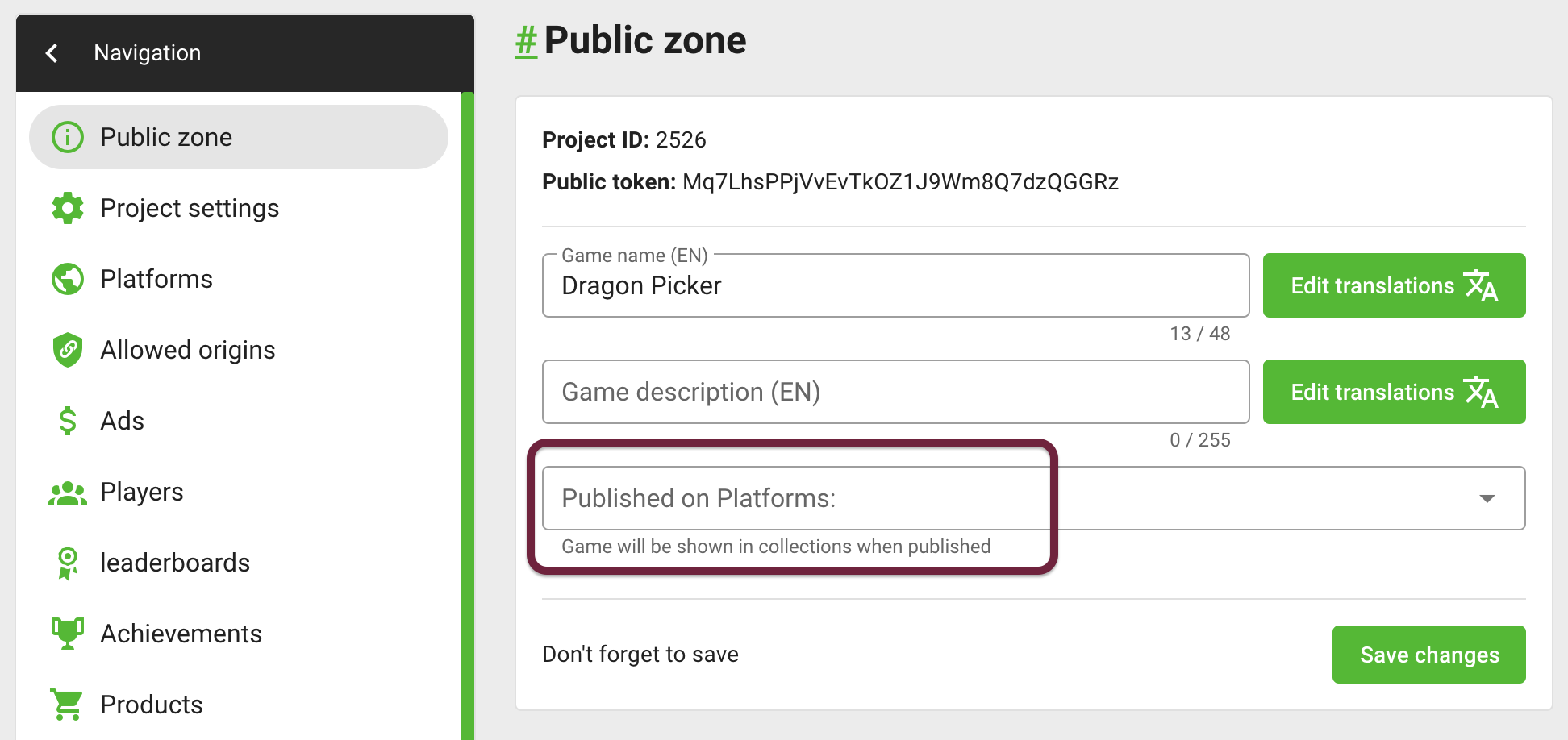
- Go to the game settings and mark all sites on which the game has already been published. This can be done in the "Published on Platforms" field in the "Public zone" section.
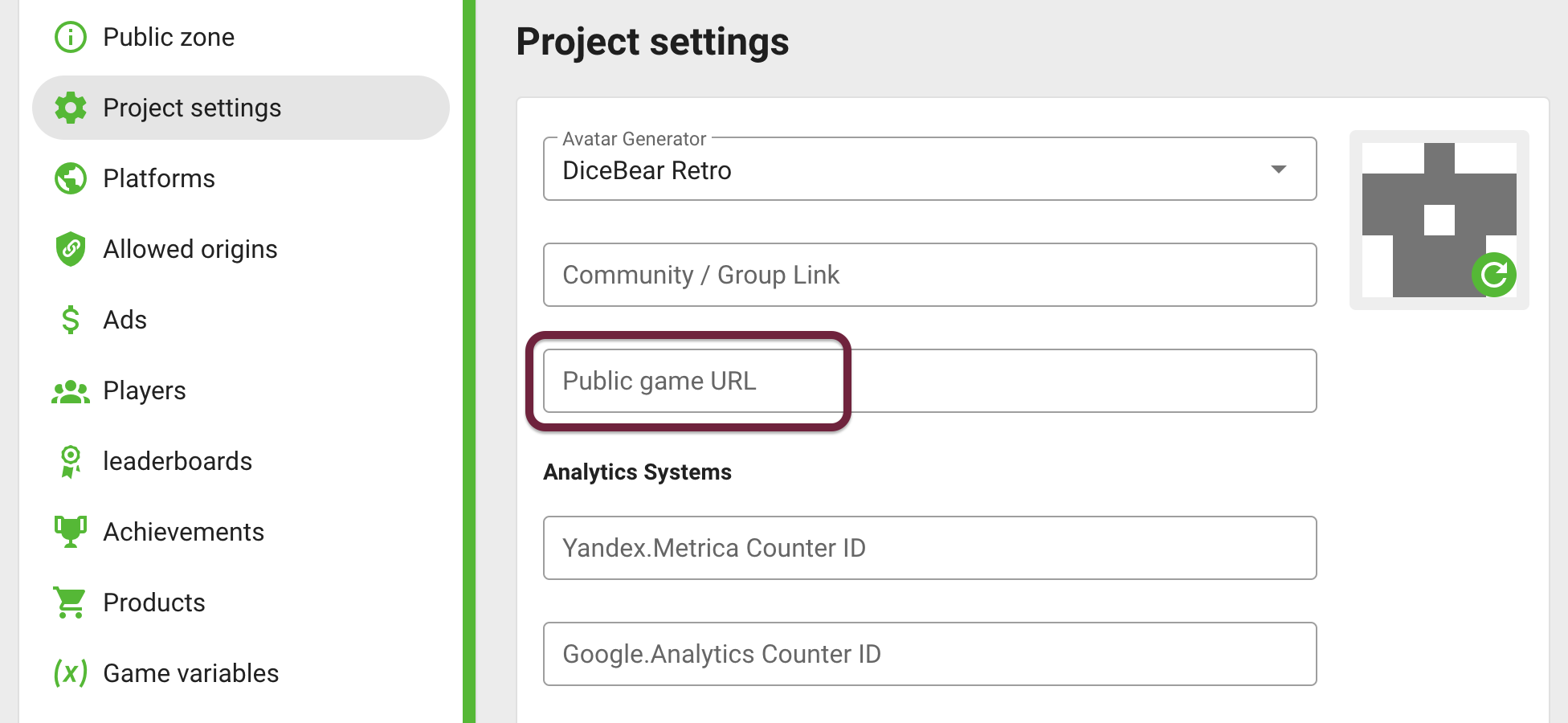
- On sites that do not support internal urls - add a public url to the game. This can be done in the "Public game URL" field in the "Project Settings" section.
Some platforms allow the exchange of links only within the platform. Below is a table of link types.
| Platform | Link Type |
|---|---|
| Yandex.Games | ✅ Internal |
| VK Games | ✅ Internal |
| VK Play | ✅ Internal |
| OK Games | ✅ Internal |
| Kongregate | ✅ Internal |
| PlayDeck | ✅ Internal |
| GooglePlay | 💡 External (Public URL) |
| CrazyGames | 💡 External (Public URL) |
| GameMonetize | 💡 External (Public URL) |
| GameDistribution | ❌ Forbidden |
| GamePix | ❌ Forbidden |
| WG Playground | ❌ Forbidden |
| POKI | ❌ Forbidden |
| SmartMarket | ❌ No sharing mechanism, can't get game url (waiting for feature) |
💡 External (Public URL) - the game will be shown only if the Public URL is filled in the game.
You can create custom games collections in Games Dashboard.
Open games collection
+1 RequestOpen overlay with all games sorted by newest
- JavaScript
- Construct 3
- Unity
gp.gamesCollections.open();

// Or by tag "ALL"
gp.gamesCollections.open({ tag: 'ALL' });
 System
 GamePushGamePush
LegendSystemGamePush
- System›Construct 3 System object
- GamePush›GamePush plugin
//Open by tag
GP_GamesCollections.Open("ALL");
Open overlay with games from special collection by ID or TAG
- JavaScript
- Construct 3
- Unity
// By custom TAG
gp.gamesCollections.open({ tag: 'HALLOWEEN_GAMES' });

// By ID
gp.gamesCollections.open({ id: 547 });
LegendSystemGamePush
- System›Construct 3 System object
- GamePush›GamePush plugin
// By custom TAG
GP_GamesCollections.Open("PUZZLES");
// By ID
GP_GamesCollections.Open("547");
Open an overlay with additional parameters for sharing in games. For example, specify the player's ID or a reward for referral. Parameters are passed in the format { "key": "value" }.
- JavaScript
- Construct 3
- Unity
gp.gamesCollections.open({
    tag: 'HALLOWEEN_GAMES',
    shareParams: {
        playerId: gp.player.id,
        fromGame: gp.projectId,
        fromPlatform: gp.platform.type,
        fromUrl: gp.app.url,
    },
});
LegendSystemGamePush
- System›Construct 3 System object
- GamePush›GamePush plugin
// Not yet implemented
Open games collection events
- JavaScript
- Construct 3
- Unity
// Overlay opened
gp.gamesCollections.on('open', () => {});

// Overlay closed
gp.gamesCollections.on('close', () => {});
LegendGamePush
- GamePush›GamePush plugin
GP_GamesCollections.Open("PUZZLES", OnOpen, OnClose);

// Overlay opened
private void OnOpen() => Debug.Log("GAMES COLLECTION: ON OPEN");

// Overlay closed
private void OnClose() => Debug.Log("GAMES COLLECTION: ON CLOSE");
Fetch games collection
+1 RequestFetch all games sorted by newest
- JavaScript
- Construct 3
- Unity
gp.gamesCollections.fetch();

// Or by tag "ALL"
gp.gamesCollections.fetch({ tag: 'ALL' });
LegendSystemGamePush
- System›Construct 3 System object
- GamePush›GamePush plugin
GP_GamesCollections.Fetch();
Fetch games from special collection by ID or TAG
- JavaScript
- Construct 3
- Unity
// By custom TAG
gp.gamesCollections.fetch({ tag: 'HALLOWEEN_GAMES' });

// By ID
gp.gamesCollections.fetch({ id: 547 });
LegendSystemGamePush
- System›Construct 3 System object
- GamePush›GamePush plugin
// By custom TAG
GP_GamesCollections.Fetch("ALL");

// By ID
GP_GamesCollections.Fetch("547");
Fetch with promises
- JavaScript
- Construct 3
- Unity
const result = await gp.gamesCollections.fetch();

// Response result
const {
    // Collection ID
    id,
    // Collection Tag
    tag,
    // Collection name
    name,
    // Collection description
    description,
    // Games in collection
    games,
} = result;
 ButtonGamePush
 SystemGamePush
 TextTextTextText
LegendButtonGamePushSystemText
- Button — Object Button (Button)
- GamePush›GamePush plugin
- System›Construct 3 System object
- Text — Object Text (Text)
Not implemented
Fetch games collection events
- JavaScript
- Construct 3
- Unity
// Fetch success
gp.gamesCollections.on('fetch', (result) => {});

/**
 * Error if fetch failed
 * @type {
 *     'not_found' |
 *      undefined
 * }
 */
gp.gamesCollections.on('error:fetch', (error) => {});
LegendGamePushText
- GamePush›GamePush plugin
- Text — Object Text (Text)
GP_GamesCollections.Fetch("PUZZLES", OnFetchSuccess, OnFetchError);

// Fetch success
private void OnFetchSuccess(string idOrTag, GamesCollectionsFetchData collection)
{
    Debug.Log("ID: " + collection.id);
    Debug.Log("TAG: " + collection.tag);
    Debug.Log("NAME: " + collection.name);
    Debug.Log("DESCRIPTION: " + collection.description);

    for (int i = 0; i < collection.games.Length; i++)
    {
        Debug.Log("GAME ID: " + collection.games[i].id);
        Debug.Log("GAME NAME: " + collection.games[i].name);
        Debug.Log("GAME DESCRIPTION: " + collection.games[i].description);
        Debug.Log("GAME ICON: " + collection.games[i].icon);
        Debug.Log("GAME URL: " + collection.games[i].url);
    }
}

// Error if fetch failed
private void OnFetchError() => Debug.Log("GAMES COLLECTION: FETCH ERROR");
Collection fields
- JavaScript
- Construct 3
- Unity
/**
 * Collection ID
 * @type {number}
 */
collection.id;

/**
 * Optional tag for help in selecting
 * You can use it instead of ID
 * @type {string}
 */
collection.tag;

/**
 * Name translated into current language
 * @type {string}
 */
collection.name;

/**
 * Description translated into current language
 * @type {string}
 */
collection.description;

/**
 * List of games in collections (sorted)
 * @type {GamePreview[]}
 */
collection.games;
LegendSystemTextGamePush
- System›Construct 3 System object
- Text — Object Text (Text)
- GamePush›GamePush plugin
public class GamesCollectionsFetchData
{
    // Collection ID
    public int id;
    //Optional tag for help in selecting
    public string tag;
    //Name translated into current language
    public string name;
    //Description translated into current language
    public string description;
    //List of games in collections (sorted)
    public Games[] games;
}
Game fields
- JavaScript
- Construct 3
- Unity
/**
 * Game ID
 * @type {number}
 */
game.id;

/**
 * Name translated into current language
 * @type {string}
 */
game.name;

/**
 * Description translated into current language
 * @type {string}
 */
game.description;

/**
 * Icon src 256x256
 * @type {string}
 */
game.icon;

/**
 * URL on platform or public URL
 * @type {string}
 */
game.url;
LegendGamePushText
- GamePush›GamePush plugin
- Text — Object Text (Text)
public class Games
{
    // Game ID
    public int id;
    //Name translated into current language
    public string name;
    //Description translated into current language
    public string description;
    //Icon src 256x256
    public string icon;
    //URL on platform or public URL
    public string url;
}
Stay in Touch
Other documents of this chapter available Here. To get started, welcome to the Tutorials chapter.
GamePush Community Telegram: @gs_community.
For your suggestions e-mail: official@gamepush.com
We Wish you Success!