Unique Values
Overview
The module allows registering unique values project-wide that are associated with a player. Only the player-owner can modify and delete the value. Once registered, no other player can have the same unique value for a specific tag.
Examples of unique values:
- Login / nickname;
- Base name / city name;
- One-of-a-kind item.
- Owner's status in a selected region.
- And much more.
Register Value
+1 RequestTo register or update a unique value, you need to pass a tag and a value.
- If the value has not been registered by the player, it will be added:
- If no one else has the same value with this tag.
- If the value already exists for the player with the same tag, it will be updated:
- If no one else has the same value with this tag.
Tag / value size should not exceed 1 KB.
- JavaScript
- Construct 3
- Unity
// Register
gp.uniques.register({ tag: 'login', value: 'Be$t_Devel0per' });

// Update by tag
gp.uniques.register({ tag: 'login', value: 'The_Be$t_Devel0per' });
 System
 GamePushGamePush
LegendSystemGamePush
- System›Construct 3 System object
- GamePush›GamePush plugin
// Register
GP_Uniques.Register("login", "Be$t_Devel0per");

// Update by tag
GP_Uniques.Register("login", "The_Be$t_Devel0per");
Events upon value registration
- JavaScript
- Construct 3
- Unity
// Successfully registered
gp.uniques.on('register', (uniqueValue) => {
    // uniqueValue.tag
    // uniqueValue.value
});

// Error during registration
gp.uniques.on('error:register', (error) => {});
 TextGamePush
LegendGamePushText
- GamePush›GamePush plugin
- Text — Object Text (Text)
public void Register() => GP_Uniques.Register("login", "The_Be$t_Devel0per", OnRegister, OnRegisterError);

// Successfully registered
private void OnRegister(string tag) => Debug.Log("ON REGISTER: SUCCESS: " + tag);
// Error during registration
private void OnRegisterError(string err) => Debug.Log("ON REGISTER: ERROR: " + err);
Registration method with promises
- JavaScript
- Construct 3
- Unity
const result = await gp.uniques.register({ tag: 'login', value: 'Be$t_Devel0per' });
/**
 * Whether the registration was successful
 * @type {boolean}
 */
result.success;
 SystemGamePush
LegendSystemGamePush
- System›Construct 3 System object
- GamePush›GamePush plugin
Not implemented
Get Value
FREE- JavaScript
- Construct 3
- Unity
// Get
const value = gp.uniques.get('login'); // string
LegendSystemText
- System›Construct 3 System object
- Text — Object Text (Text)
// Get
string value = GP_Uniques.Get("login");
List of Values
All unique values registered by the player.
FREE- JavaScript
- Construct 3
- Unity
const values = gp.uniques.list;
LegendSystemGamePushText
- System›Construct 3 System object
- GamePush›GamePush plugin
- Text — Object Text (Text)
UniquesData[] uniques = GP_Uniques.List();
foreach(UniquesData data in uniques)
{
    Debug.Log($"TAG: {data.tag}, VALUE: {data.value}");
}
Example content:
[
    { tag: 'login', value: 'Be$t_Devel0per' },
    { tag: 'cityName', value: 'Crabifornia' },
    { tag: 'item', value: 'THOUSAND_TRUTHS_SWORD' },
    { tag: 'title', value: 'GAME_LORD' },
];
Check Value
+1 RequestTo check a unique value, you need to pass a tag and a value. This may be needed for real-time validation. Upon attempting to register a value, it will be checked again.
- JavaScript
- Construct 3
- Unity
// Check
gp.uniques.check({ tag: 'login', value: 'Be$t_Devel0per' });
LegendSystemGamePush
- System›Construct 3 System object
- GamePush›GamePush plugin
// Check
GP_Uniques.Check("login", "Be$t_Devel0per");
Events upon checking a value
- JavaScript
- Construct 3
- Unity
// Checked successfully, no match found
gp.uniques.on('check', (uniqueValue) => {
    // uniqueValue.tag
    // uniqueValue.value
});

// Error during check
gp.uniques.on('error:check', (error) => {});
LegendGamePush
- GamePush›GamePush plugin
public void Check() => GP_Uniques.Check("login", "The_Be$t_Devel0per", OnCheck, OnCheckError);

// Checked successfully, no match found
private void OnCheck(string tag) => Debug.Log("ON CHECK: SUCCESS: " + tag);
// Error during check
private void OnCheckError(string err) => Debug.Log("ON CHECK: ERROR: " + err);
Check method with promises
- JavaScript
- Construct 3
- Unity
const result = await gp.uniques.check({ tag: 'login', value: 'Be$t_Devel0per' });
/**
 * Checked successfully, no match found
 * @type {boolean}
 */
result.success;
LegendSystemGamePush
- System›Construct 3 System object
- GamePush›GamePush plugin
Not implemented
Delete Value
+1 RequestYou can release an unnecessary value for other players to make it available again.
- JavaScript
- Construct 3
- Unity
// Delete
gp.uniques.delete({ tag: 'login' });
LegendSystemGamePush
- System›Construct 3 System object
- GamePush›GamePush plugin
// Delete
GP_Uniques.Delete("login");
Events upon deleting a value
- JavaScript
- Construct 3
- Unity
// Deleted successfully
gp.uniques.on('delete', (uniqueValue) => {
    // uniqueValue.tag
    // uniqueValue.value
});

// Error during deletion
gp.uniques.on('error:delete', (error) => {});
LegendGamePush
- GamePush›GamePush plugin
public void Delete() => GP_Uniques.Delete("login", OnDelete, OnDeleteError);

// Deleted successfully
private void OnDelete(string tag) => Debug.Log("ON DELETE: SUCCESS: " + tag);
// Error during deletion
private void OnDeleteError(string err) => Debug.Log("ON DELETE: ERROR: " + err);
Delete method with promises
- JavaScript
- Construct 3
- Unity
const result = await gp.uniques.delete({ tag: 'login' });
/**
 * Deleted successfully
 * @type {boolean}
 */
result.success;
LegendSystemGamePush
- System›Construct 3 System object
- GamePush›GamePush plugin
Not implemented
Data Management
Through the admin panel, you can add, edit, and delete unique values in the "Unique Values" section of the project.
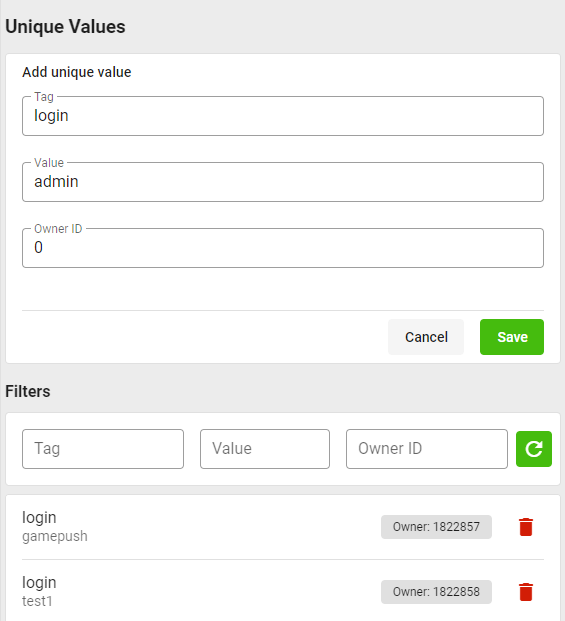
In the add form, you can:
- Specify a tag within which the unique value will be created.
- Specify the unique value (string).
- Specify the ID of the player-owner to whom the value belongs;
0reserved by the system.
Data Censorship
If you want to protect players from bad words, you can use the value censorship option.
You can choose censorship algorithms:
-
Simplified. We will use brute force and stemming algorithms to validate inappropriate words as efficiently as possible.
- Bad word lists in 25 languages. More than 6500 words;
- Stemming in 8 popular languages. Extracting the base form of a word to rule out different ways of writing a bad word;
- Links validation.
-
AI-Based Censorship:
- Instead of brute force, context understanding is used;
- Provides high recognition quality, but resource costs are also high;
- Recognition of complex cases such as
A$_H@LE,2girls1cup,πздец / 3.14здецand others; - Multilingual, understanding of profanity and contextual insults in each language.
There is an additional charge for each censorship request.
If AI-Based Censorship is used: Minimum cost for 1 check — 3 requests, plus +1 request for every 20 tokens of text (GPT tokens).
If simplified filter is used: Additional cost for 1 check — 1 request.
In the GamePush control panel under "Unique Values," create a rule for the desired tag.
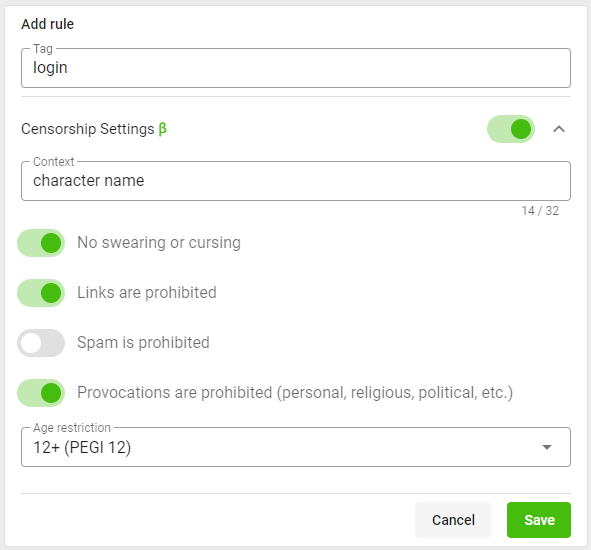
In the add form, you can:
- Specify a tag for the rule.
- Configure censorship:
- Specify the context of values:
- Specify in English what the text is intended for, for example
character nameorgame chat. This will help the AI understand if the text violates the rules. For example, if a player specifiesUgly Guyas a nickname, it is acceptable; however, if they write that in the chat, it might offend other players, though this depends on the full sentence context.
- Specify in English what the text is intended for, for example
- Forbid profanity and swear words.
- Forbid links.
- Forbid spam.
- Forbid provocations that may offend players in some way.
- Specify age restrictions for content.
- In games rated 0+, it is undesirable to use any bad words. In games rated 16+, mild profanity and euphemisms without offensive context may be acceptable, for example,
darn. In games rated 18+, profanity may be allowed, but not directed at players. The AI follows your context but may even find such words unsuitable within the context of 18+ games.
- In games rated 0+, it is undesirable to use any bad words. In games rated 16+, mild profanity and euphemisms without offensive context may be acceptable, for example,
- Specify the context of values:
Data Types
Unique Value
| Field | Type | Description | Example |
|---|---|---|---|
tag | string | Value tag | login |
value | string | Value | Be$t_Devel0per |
Error Codes
| Error | Error Description |
|---|---|
| player_not_found | Player not found |
| empty_tag | Empty value tag passed |
| unique_value_not_found | Value with this tag not found |
| already_exists | Value already taken |
| size_limit_exceeded | Size limit exceeded |
| bad_value_filter_censor | Value failed censorship check |
| undefined | Unexpected error (check console for details) |
Stay in Touch
Other documents of this chapter available Here. To get started, welcome to the Tutorials chapter.
GamePush Community Telegram: @gs_community.
For your suggestions e-mail: official@gamepush.com
We Wish you Success!