Channel and Message Tags
Overview
When creating a channel from the GamePush control panel, it is possible to set channel tags and message tags. Channel and message tags are used to simplify searches. Based on tags, you can implement giving gifts, displaying system messages and much more:
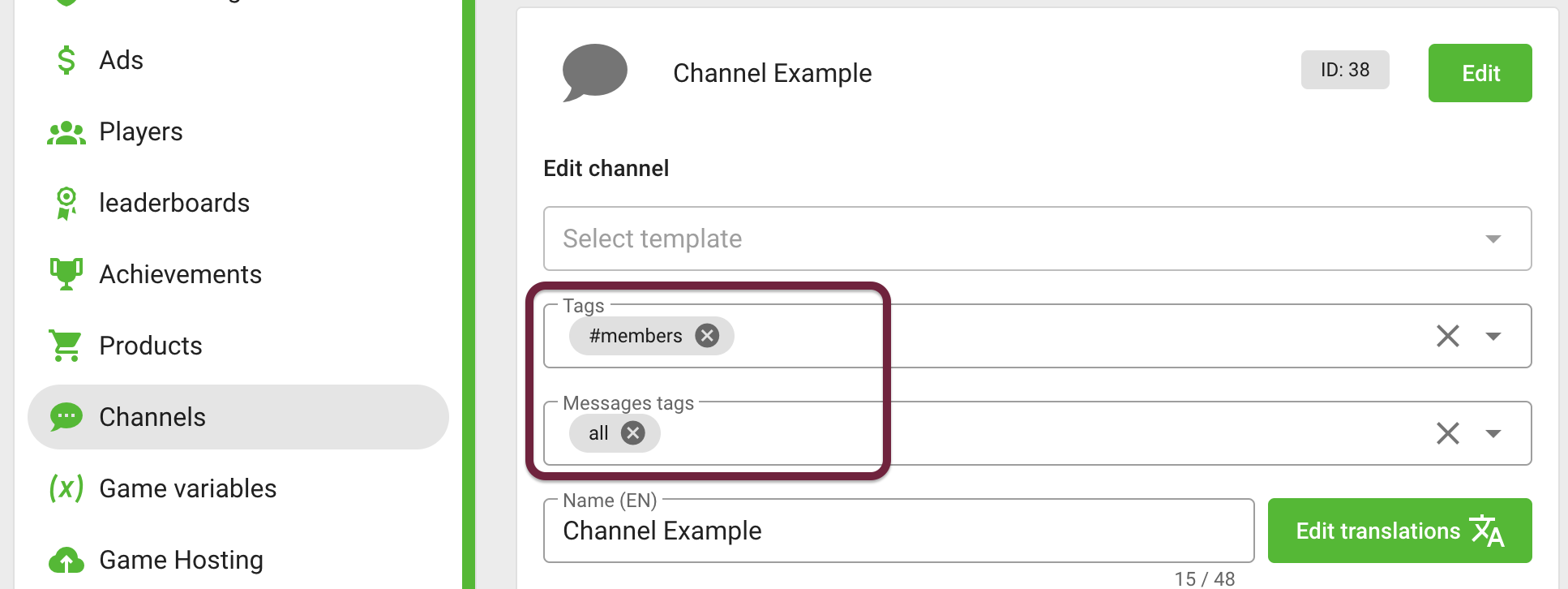
Tags should be used to simplify the search for messages and expand their functionality
gp.channels.fetchChannels- channel search by tags
Through message tags you can get all messages in the channel, or part of the messages (for example, system messages or logs):
gp.channels.fetchMessages- search for messages by tags in a channel
Search Channels by Tags
Consider an example of searching for an in-game event: "passing a dungeon" by channel tags
The example shows the creation of a group for the passage of a location with four tags that characterize it:
- location:
dungeon - name:
Demons Lord Castle - number of participants:
x5 - level of difficulty:
heroic
Other players can find this dungeon by the corresponding tags:
- JavaScript
- Construct 3
- Unity
gp.channels.fetchChannels({
    tags: ['dungeon', 'x5', 'demons_lord_castle', 'heroic']
});
 System
 GP_Channels
LegendSystemGP_Channels
- System›Construct 3 System object
- GP_Channels›GamePush Channels plugin
public void FetchChannels()
{
    var filter = new FetchChannelsFilter();
    filter.tags = new string[] {"dungeon", "x5", "demons_lord_castle", "heroic"};

    GP_Channels.FetchChannels(filter);
}
Tags can make your search more flexible. If one of the characteristics of the search is not important, for example, the name Demons Lord Castle, then you can expand the search for available dungeons:
- JavaScript
- Construct 3
- Unity
gp.channels.fetchChannels({
    tags: ['dungeon', 'x5', 'heroic']
});
LegendSystemGP_Channels
- System›Construct 3 System object
- GP_Channels›GamePush Channels plugin
public void FetchChannels()
{
    var filter = new FetchChannelsFilter();
    filter.tags = new string[] {"dungeon", "x5", "heroic"};

    GP_Channels.FetchChannels(filter);
}
Search Messages by Tags
Example of searching messages in a chat by tags
In channels, it may be necessary to separate messages into categories. For example, you can separate communication and system messages. In this case, there is no need to create separate channels for categories, instead, you can mark up messages with tags and filter by them.
To send a chat message with channelId: 43 and "chat" tag:
- JavaScript
- Construct 3
- Unity
gp.channels.sendMessage({
    channelId: 43,
    text: "Hi there, 5 min and go",
    tags: ["chat"]
});
LegendSystemGP_Channels
- System›Construct 3 System object
- GP_Channels›GamePush Channels plugin
GP_Channels.SendMessage(
  channel_ID: 43,
  text: "Hi there, 5 min and go",
  tags: "chat"
);
To get all messages with a tag "chat":
- JavaScript
- Construct 3
- Unity
gp.channels.fetchMessages({
    channelId: 43,
    tags: ["chat"]
});
LegendSystemGP_Channels
- System›Construct 3 System object
- GP_Channels›GamePush Channels plugin
GP_Channels.FetchMessages(
  channel_ID: 43,
  tags: "chat"
);
You can get all dungeon system events using the tag "log":
- JavaScript
- Construct 3
- Unity
gp.channels.fetchMessages({
    channelId: 43,
    tags: ["logs"]
});
LegendSystemGP_Channels
- System›Construct 3 System object
- GP_Channels›GamePush Channels plugin
GP_Channels.FetchMessages(
  channel_ID: 43,
  tags: "logs"
);
When killing a boss in a dungeon, you can report a reward. The developer can do this on behalf of the group leader in a convenient format, such as JSON:
- JavaScript
- Construct 3
- Unity
gp.channels.sendMessage({
    channelId: 43,
    text: `{
        "event": "boss_killed",
        "boss": "DEMON_LORD",
        "loot": [
            "SAPOGI_SMERTI",
            "OGNENNYI_MECH",
        ]
    }`,
    tags: ["logs"]
});
 JSONJSONJSONJSONGP_Channels
LegendSystemJSONGP_Channels
- System›Construct 3 System object
- JSON — Object JSON (JSON)
- GP_Channels›GamePush Channels plugin
GP_Channels.SendMessage(
  channel_ID: 43,
  text:
  "{
    event: boss_killed,
    boss: DEMON_LORD,
    loot:
    [
        SAPOGI_SMERTI,
        OGNENNYI_MECH,
    ]
  }",
  tags: "logs"
);
Tags in Private Messages and Feeds
Using message tags, you can implement gifts to players. For example, using the "gift" tag, you can send a personal message with a gift for the player playerId: 43:
- JavaScript
- Construct 3
- Unity
gp.channels.sendPersonalMessage({
    playerId: 43,
    text: `{"itemId": 5}`,
    tags: ["gift"]
});
LegendSystemJSONGP_Channels
- System›Construct 3 System object
- JSON — Object JSON (JSON)
- GP_Channels›GamePush Channels plugin
GP_Channels.SendPersonalMessage(
  player_ID: 43,
  text: "{itemId: 5}",
  tags: "gift"
);
You can view the list of sent gifts by requesting a list of messages:
- JavaScript
- Construct 3
- Unity
gp.channels.fetchPersonalMessages({ playerId: 43, limit: 100 });
LegendSystemGP_Channels
- System›Construct 3 System object
- GP_Channels›GamePush Channels plugin
GP_Channels.FetchPersonalMessages(
  playerId: 43,
  limit: 100
);
However, if the players are actively using the chat, then the information about the gift can be quite far away. In order not to load all messages, you can also search for a gift by the gift tag:
- JavaScript
- Construct 3
- Unity
gp.channels.fetchPersonalMessages({ playerId: 43, limit: 100, tags: ["gift"] });
LegendSystemGP_Channels
- System›Construct 3 System object
- GP_Channels›GamePush Channels plugin
GP_Channels.FetchPersonalMessages(
  playerId: 43,
  limit: 100,
  tags: "gift"
);
Stay in Touch
Other documents of this chapter available Here. To get started, welcome to the Tutorials chapter.
GamePush Community Telegram: @gs_community.
For your suggestions e-mail: official@gamepush.com
We Wish you Success!