Adding a Game
To use the GamePush SDK features:
- Add the game in the GamePush control panel
- Enter the name of the game and click the "Add game" button.
- After that, you will be taken to the GamePush control panel interface.
Code installing
To embed GamePush SDK in the game:
- JavaScript
- Construct 3
- Unity
- Defold
- Godot
- GameMaker
- Add the script in
index.html - Indicate
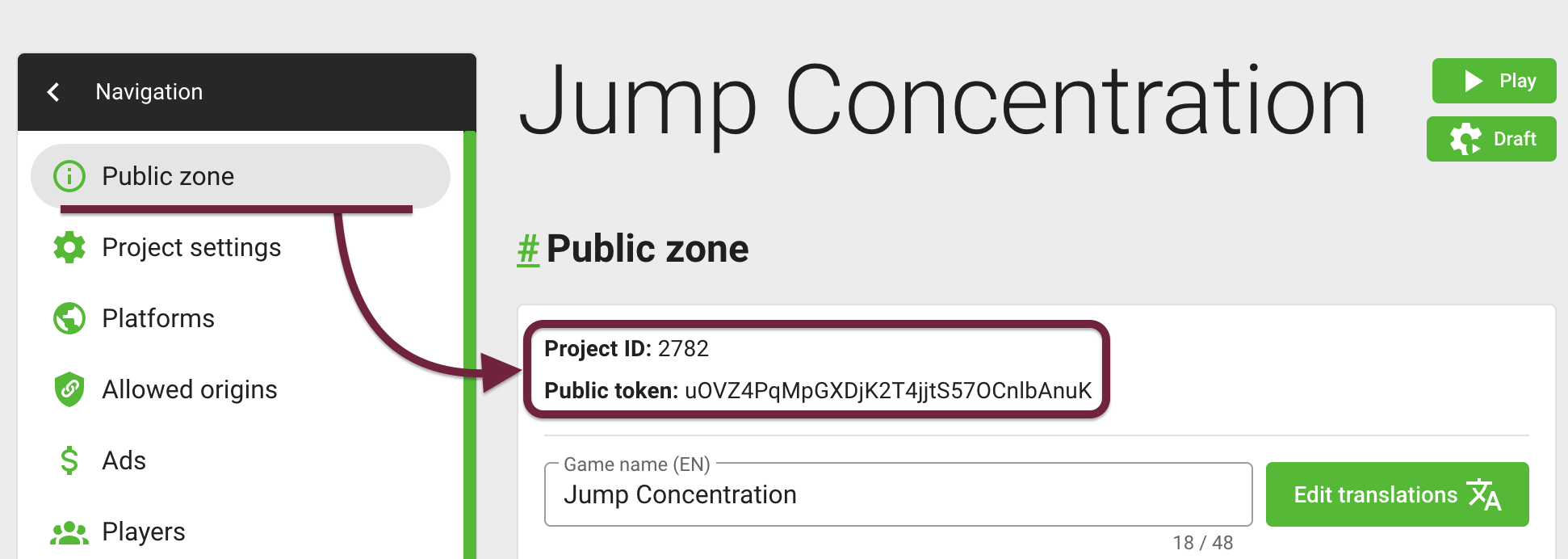
projectIdandpublicToken. They must correspond to theID of the projectandpublic keyfrom the GamePush control panel:
// place the code before the closing body tag
<script>
    window.onGPInit = function (gp) {
        // All GamePush features are available here
    };
    ((s,c,o,r,e)=>{var f=0,t={},p=0,m=r.length,w=[],j=u=>{if(f||t[u])return;f=1;t[u]=1;var d=c.createElement(o);d.async=1;d.src=u+e;d.onerror=()=>{f=0;n()};var a=c.getElementsByTagName(o)[0];a.parentNode.insertBefore(d,a)},n=()=>{for(var k=0;k<w.length;k++)if(!t[w[k]])return j(w[k])},q=()=>{++p>=m&&!f&&n()};r.forEach(u=>s.fetch(u,{method:"HEAD"}).then(x=>{x&&x.ok?(w.push(u),j(u)):q()}).catch(q));s.setTimeout(()=>{f||n()},5000)})(window,document,"script",atob("aHR0cHM6Ly9ncy5lcG9uZXNoLmNvbS9zZGsvZ2FtZS1zY29yZS5qcyxodHRwczovL3MzLmdhbWVwdXNoLmNvbS9maWxlcy9ncy9zZGsvZ2FtZS1zY29yZS5qcyxodHRwczovL3MzLWV1LmdhbWVwdXNoLmNvbS9zZGsvZ2FtZS1zY29yZS5qcyxodHRwczovL2dhbWVwdXNoLmNvbS9zZGsvZ2FtZS1zY29yZS5qcw==").split(","),"?projectId=2782&publicToken=xT3RpsJMXpKWHPrTWkv3VBeHJKvCBccT&callback=onGPInit");
</script>
Follow this instructions: How to install GamePush plugin in Construct 3.
Follow this instructions: Adding plugin to a Unity Project.
Follow this instructions: How to install GamePush plugin in Defold.
Follow this instructions: How to install GamePush plugin in Godot.
Follow this instructions: How to install GamePush extension in GameMaker.
GamePush SDK initialization
- JavaScript
- Construct 3
- Unity
- GameMaker
After initializing the GamePush SDK, the onGPInit function will be called, in which a ready-to-use SDK instance with all managers will be passed as an argument. For correct interaction with the player, you need to wait synchronizing the player with the server.
// place the code before the closing body tag
<script>
window.onGPInit = async (gp) => {
    // Wait while the player syncs with the server
    await gp.player.ready;
    // Show the ad preloader and wait until it ends
    await gp.ads.showPreloader();
    // Show the sticky banner (then it will update itself)
    gp.ads.showSticky();

    // You can start the game :)
};
((s,c,o,r,e)=>{var f=0,t={},p=0,m=r.length,w=[],j=u=>{if(f||t[u])return;f=1;t[u]=1;var d=c.createElement(o);d.async=1;d.src=u+e;d.onerror=()=>{f=0;n()};var a=c.getElementsByTagName(o)[0];a.parentNode.insertBefore(d,a)},n=()=>{for(var k=0;k<w.length;k++)if(!t[w[k]])return j(w[k])},q=()=>{++p>=m&&!f&&n()};r.forEach(u=>s.fetch(u,{method:"HEAD"}).then(x=>{x&&x.ok?(w.push(u),j(u)):q()}).catch(q));s.setTimeout(()=>{f||n()},5000)})(window,document,"script",atob("aHR0cHM6Ly9ncy5lcG9uZXNoLmNvbS9zZGsvZ2FtZS1zY29yZS5qcyxodHRwczovL3MzLmdhbWVwdXNoLmNvbS9maWxlcy9ncy9zZGsvZ2FtZS1zY29yZS5qcyxodHRwczovL3MzLWV1LmdhbWVwdXNoLmNvbS9zZGsvZ2FtZS1zY29yZS5qcyxodHRwczovL2dhbWVwdXNoLmNvbS9zZGsvZ2FtZS1zY29yZS5qcw==").split(","),"?projectId=4&publicToken=xT3RpsJMXpKWHPrTWkv3VBeHJKvCBccT&callback=onGPInit");
</script>
GamePush SDK initializes automatically.
GamePush SDK initializes automatically.
GamePush SDK initializes automatically.
Stay in Touch
Other documents of this chapter available Here. To get started, welcome to the Tutorials chapter.
GamePush Community Telegram: @gs_community.
For your suggestions e-mail: official@gamepush.com
We Wish you Success!