Chat Notifications
Notify players about personal messages, feed messages, channel messages and invites from channels when they are not in the game.
Settings
Chat notifications are configured in the control panel, in the notification settings. For each event, choose the mode:
| Mode | Behavior |
|---|---|
| Disabled | Do not send notifications |
| If set in SDK when sending | Send only if the game passed notificationOptions with enable: true when sending the message |
| All messages | Send for every message, except messages with notificationOptions: { enable: false } |
Events:
| Event | Default mode | Method |
|---|---|---|
| Personal messages | If set in SDK when sending | gp.channels.sendPersonalMessage |
| Feed messages | If set in SDK when sending | gp.channels.sendFeedMessage |
| Channel messages | Disabled | gp.channels.sendMessage |
| Push about channel invites | Enabled | gp.channels.sendInvite |
For each event you can set a default template. It is used when the game does not pass its own template. A default template does not need the Allow from players option: you choose it in the control panel, not the game.
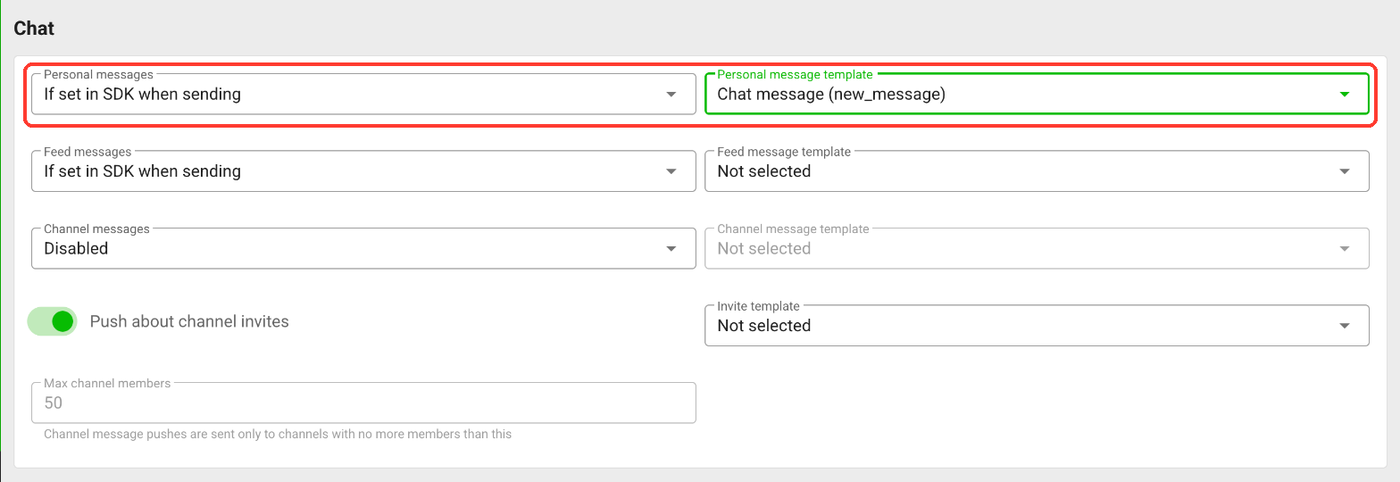
Max channel members — notifications about channel messages are sent only to channels with no more members than this number, 50 by default. Large channels and global chats do not send pushes.
Use the If set in SDK when sending mode for most games. Then you decide in code which messages are worth a push: a gift or a guild invite — yes, "ok" in a chat — no.
How to Turn On a Notification from Code
To notify the player about a message, pass the notification parameters notificationOptions to gp.channels.sendMessage, gp.channels.sendPersonalMessage, gp.channels.sendFeedMessage and gp.channels.sendInvite.
| Parameter | Type | Description |
|---|---|---|
enable | boolean | Send a notification about this message. Required |
template | string | Template tag or ID. The template must allow use from players. If not passed, the default template of the event is used |
variables | object | Template variables, {variables.<key>} or {<key>} |
payload | string | Payload for the game when the player opens the notification. More |
inbox | boolean | Also put the message into the recipient's inbox, even if the recipient is in the game |
inboxTags | string[] | Tags of the inbox message |
In chat templates the following variables are available: {sender.name}, {sender.id}, {sender.avatar}, {message.text}, {channel.name} (channel messages and invites only), {player.name} (recipient), {count} (number of combined messages) and your variables. More about variables
Personal Message
The template CHAT_MESSAGE with the text:
{sender.name}: {message.text}
gp.channels.sendPersonalMessage({
    playerId: 123456,
    text: 'Hi! Join my guild',
    notificationOptions: {
        enable: true,
        template: 'CHAT_MESSAGE',
        payload: JSON.stringify({ screen: 'chat', playerId: gp.player.id }),
    },
});
Gift
The template GIFT with the text:
{sender.name} sent you a gift!
gp.channels.sendPersonalMessage({
    playerId: 123456,
    text: 'gift',
    tags: ['gift'],
    notificationOptions: {
        enable: true,
        template: 'GIFT',
        payload: 'screen=gifts',
        // Also put into the inbox so that the player sees the gift in the game
        inbox: true,
        inboxTags: ['gifts'],
    },
});
Feed Message
gp.channels.sendFeedMessage({
    playerId: 123456,
    text: 'Congratulations on the new level!',
    notificationOptions: {
        enable: true,
    },
});
Channel Message
gp.channels.sendMessage({
    channelId: 123,
    text: 'Raid starts in 10 minutes!',
    notificationOptions: {
        enable: true,
        template: 'GUILD_RAID',
        variables: { minutes: 10 },
    },
});
Invite to a Channel
gp.channels.sendInvite({
    channelId: 123,
    playerId: 123456,
    notificationOptions: {
        enable: true,
        template: 'GUILD_INVITE',
        payload: JSON.stringify({ screen: 'invites' }),
    },
});
Anti-Spam
- A notification is sent only to recipients who are offline. Players in the game see the message in the chat.
- The first push waits 2 minutes: if the sender writes several messages in a row, the player gets one push with the last message and
{count}. - Notifications from one sender are combined: no more than once every 5 minutes. The push shows the last message. With
inbox: trueevery message gets its own inbox entry right away, the combining applies only to pushes. - One player can trigger notifications from no more than 30 messages per hour. Later messages are delivered to the chat without notifications.
- The message text passes the censor before it gets into the notification. In
{message.text}it is cut to 200 characters. If the text looks like JSON (starts with{or[),{message.text}is empty — write the template so that it reads well without it, for example{sender.name} sent you a gift!. - If the template has no icon, the push uses the sender avatar as the icon (where the channel shows icons).
- The daily limit per player and platform limits apply.
- A template passed in
notificationOptions.templatemust have the Allow from players option, otherwise the notification is not sent (the message itself is sent).
Stay in Touch
Other documents of this chapter available Here. To get started, welcome to the Tutorials chapter.
GamePush Community Telegram: @gs_community.
For your suggestions e-mail: official@gamepush.com
We Wish you Success!